

Requires: SmartSpice & Smartview
Minimum Versions: SMARTSPICE 3.16.12.R
The Example “ParametricAlters.in” demonstrates how to optimize performance and memory usage for parametric alters. The following algorithm is used in this example.
1. SMARTSPICE reads the input file, up to the first .ALTER statement and creates basic circuit for simulation. In batch mode SMARTSPICE performs simulation or commands from .control block. In GUI mode SMARTSPICE performs commands only from .control block.
2. After that SMARTSPICE reads the input between .ALTER statement, and either the next .ALTERstatement or the .END statement. New block of statements will be used to modify basic circuit.
3. SMARTSPICE modifies the circuit and then resimulates.
4. SMARTSPICE repeats steps 2 and 3 until all netlist will be processed. SMARTSPICE performs the analyses on those that precede the first .ALTER statement as basic for all .ALTER statements.
To execute this example, do the following:
1. Source the simulation input deck “ParametricAlters.in” in SmartSpice. A control block automatically performs settings and starts the simulation.
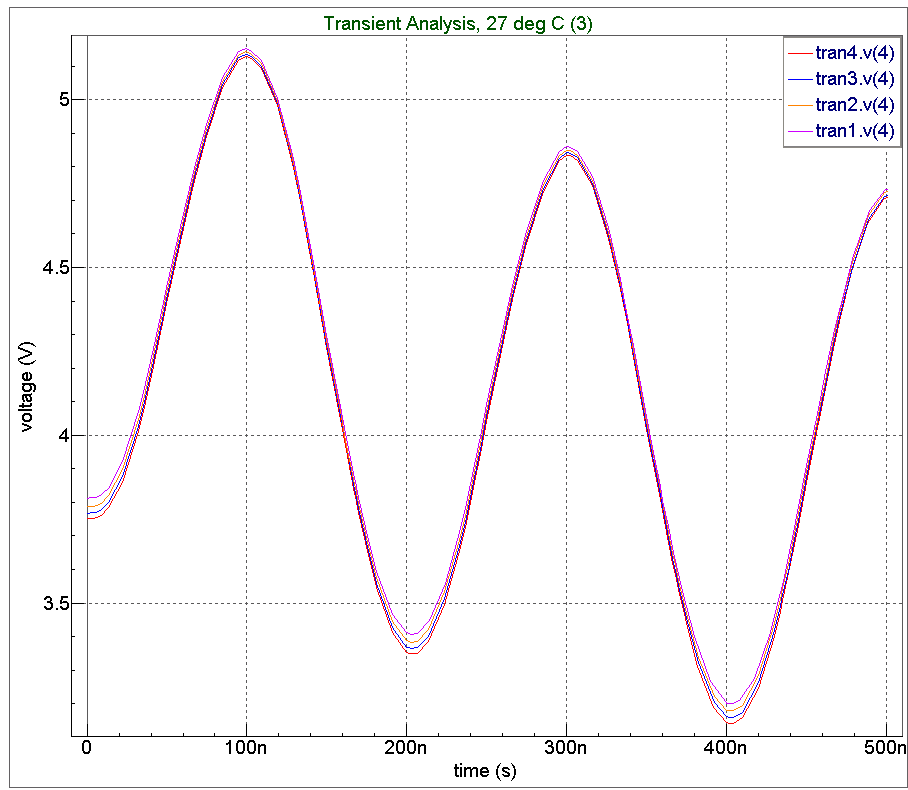
2. When the simulation completes, the result waveforms “ParametricAlters.png” can be displayed in Smartview for postprocessing.
For more details, refer to the SmartSpice User’s manual vol.1 Chapter 2.
The input deck shows the full test bench for the example. The final results can be examined in the output chart in Smartiew.
Input Files
ParametricAlters.in — view contents
* ALTERMODE example

VIN  1 0  DC 0  SIN(0 0.1 5MEG)  AC 1

VCC  8 0  DC 10

VEE  9 0  DC -12

RS1  1 2  1K

RS2  5 0  1K

RC1  3 8  10K

RC2  4 8  10K

RBIAS  7 8  20K

CLOAD  3 4  5PF

Q1  3 2 6  QNL

Q2  4 5 6  QNL

Q3  6 7 9  QNL

Q4  7 7 9  QNL

.MODEL QNL NPN(BF='a' RB=100 CCS=2PF TF=0.3NS TR=6NS CJE=3PF CJC=2PF VA=50)

.TRAN 5NS 500NS

.probe V(1) V(3) V(4)


.param a=80

.OPTIONS ACCT  RELTOL=0.001 NOMOD   acct=2   probe


.control

set altermode=true

run batchprint

.endc


.alter  1

.param   a=90


.alter   2

.param   a=100


.alter  3

.param   a=110


.end