

Requires: SmartSpice & Smartview
Minimum Versions: SMARTSPICE 3.16.12.R
First we can look at the simple .noise analysis of a resistor to see the characteristic over frequency.
Take input deck and run in SmartSpice saying YES to run all alter cases.
Two simulations are run and then you can select the noise vectoor to plot as shown in
this
view of the vector wuindow.
You will then get a
plot
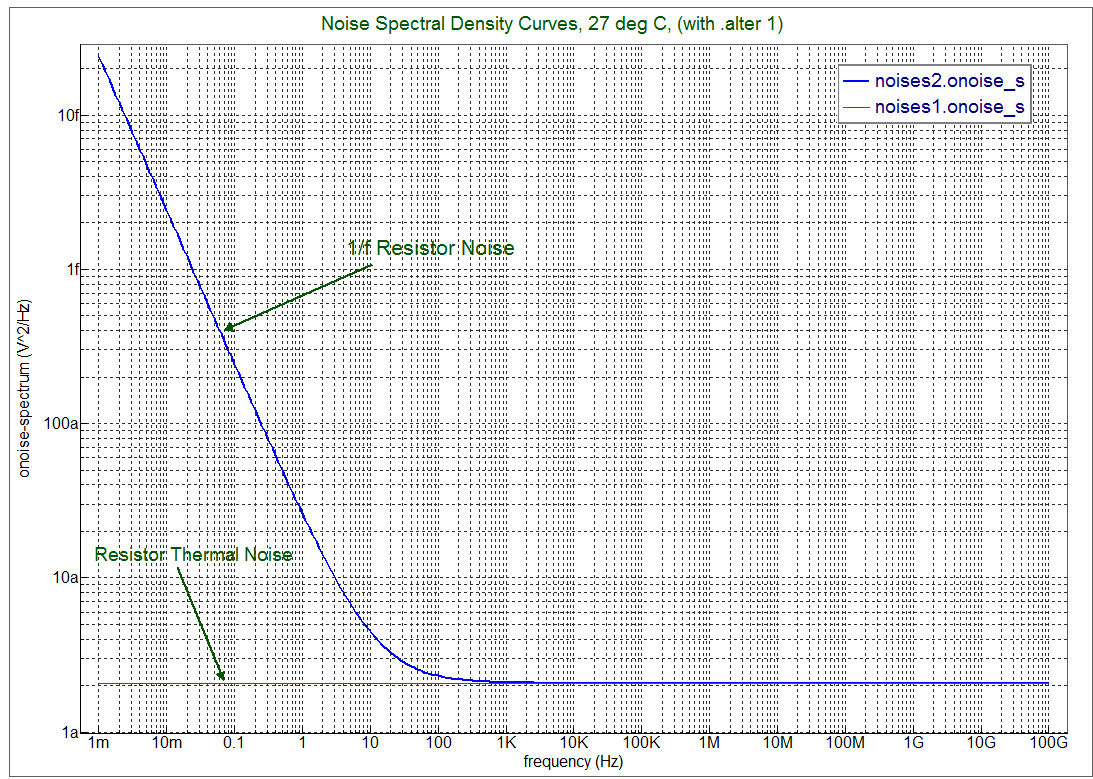
of waveforms that show the low frequency 1/f increasing noise level with lower frequency and the other flat line showing just the thermal noise contribution.
Graphics

Input Files
res_1ow_freq_noise.in
* Resistor 1/f and thermal noise example
********************************************
.options post list

v1 1 0 10 ac=1
R1 1 2 Res1 1k
R2 2 3 Res2 1k
R3 3 4 Res1 1k noise=0
R4 4 0 Res2 1k noise=1

.model Res1 R noise=1 l=1u dlr=0.01u w=10u dw=0.01u
.model Res2 R noise=0 l=1u w=10u
.model Res3 R
.model Res4 R

.ac dec 20 0.001 100G
**.noise v(2,3) v1 10
.noise v(2,3) v1 dec 20 0.001 100G
.print noise inoise onoise
.op

.alter
.model Res1 R noise=1 kf=6.0e-28 af=2 lf=1 wf=1 ef=1 l=1u dlr=0.01u w=10u dw=0.01u

.end
inoise_i.in
*
* inoise_(s,t)_i with input Current source
*
I1 TEST  0  DC 0  AC 1
R1 TEST  0  2K
*
.NOISE V(TEST) i1 DEC 10 1000 1G

.END