

Minimum Versions: SmartSpice 4.6.5.R
The
input deck shows you how to produce a single element that behaves as a Frequency Modulated (FM) source.
If the modulation is small you can simulate the the input waveform with a variation like Jitter to see the effect through subsequent circuits.
The Waveform
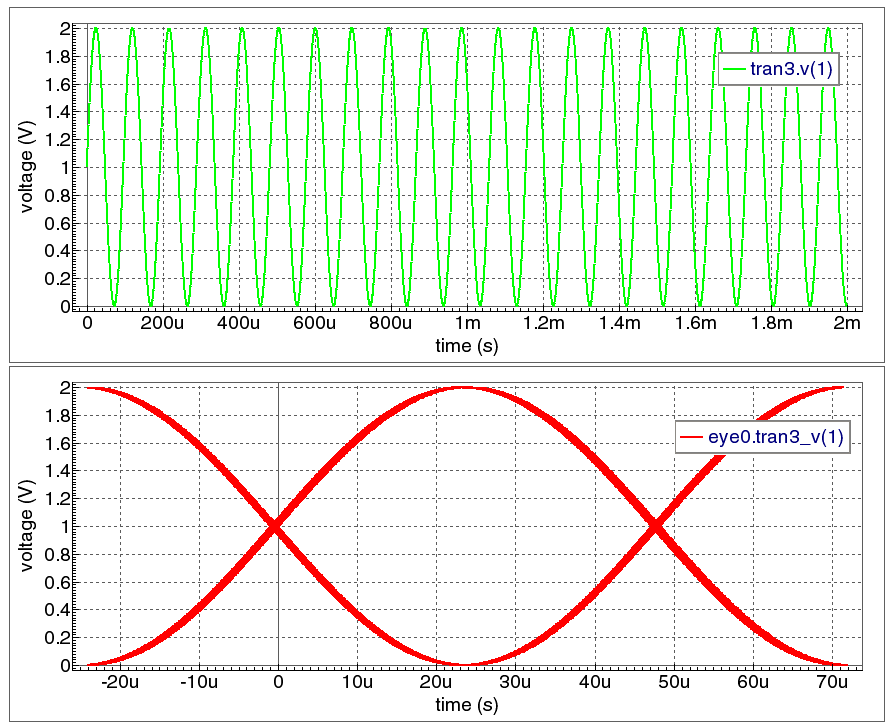
results
show how the final frequency modulated waveform output looks in the time domain and
after a jitter analysis in SmartView to simulate the sort of drift in frequency you may see from an non-ideal source.
(This is not a true random jitter variation, but allows simulation of circuitry fed by a variation you may see from a real source).
Note:
You can change the modulating source to give different jitter coverage levels as required.
Graphics
Input Files
Vsource_FM_mod.in
* Frequency Modulated Source element
**************************************cs

.option nomod nodeck accurate

.param fm =40
V1 1 0 sffm(1 1 10k 10 FM )
R1 1 0 100k
.tran .02u 2000u ;sweep fm 5k 20k 5k
.save all(v)
.end