

Minimum Required Version: Expert 4.14.0.R, Guardian 4.14.0.R
Guardian DRC contains a SELECT statement that can be used to identify layout objects for a particular design rule check. The SELECT statement has many different forms; each signified by a different relational options. In this example, the OUTSIDE relational option is demonstrated with the SELECT operation.
Loading the Example Circuit and DRC Script
Open Expert and load the example circuit in the Expert project select_outside.eld and open the sample layout cell named DFF. This sample layout contains a D-Flip Flop circuit which will be used to show the operation of the SELECT command. Next, the DRC script containing the appropriate rule set must be loaded by selecting the Expert menu Verification->DRC->DRC Script Panel. From the script panel, select File->Open and browse to the DRC rule set for this example, named select_outside.dsf.
Syntax
The syntax for the SELECT command with relation=OUTSIDE can be seen several times in the example DRC script and is also reproduced below:
   SELECT: Relation=OUTSIDE,
          [Options=([C][,NOT]),]
           Layer1=< layer1 identifier >,
           Layer2=< layer2 identifier >,
           LayerR=< result layer identifier >;
This command creates shapes on LayerR of Layer1 that are completely outside of Layer2. One of the possible options settings shown above is Options=(C), in which the selection operation will be based on electrical connectivity information. Using Options=(NOT) will perform the selection operation if the conditions of the select command are not met. This option is used in the example script to find any regions where P+ active and N+ active overlap. The scratch layer “p_n_overlap” is created by the SELECT command and then is flagged as an error in the error database by using the COPY command, which will copy the resulting geometry “p_n_overlap” to ID=”text”, which contains the rule name or description.
The “p_n_overlap” scratch layer, along with other scratch layers generated by the Guardian commands are written back to the layout in this example deck. To prevent any scratch layers from being written to the layout, the command:
update_layout:new=yes;
can be changed to
update_layout:new=no.
DRC Output
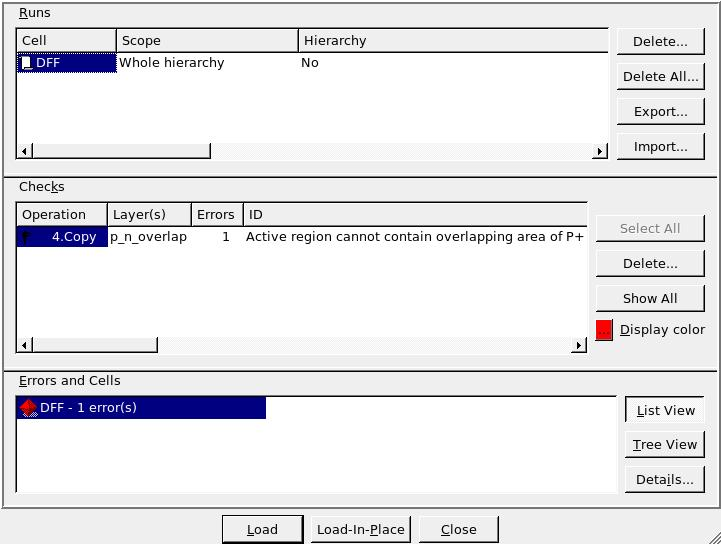
To run the example DRC script, select the menu item DRC->Run from the DRC script panel with the select_outside.dsf script loaded. Once the DRC is complete, return to the Expert window containing the layout and select Verification->DRC->Errors->Load Errors. This will open the error window containing all errors found by the DRC script. As seen in Figure1, there is one error for the overlapping of N+ active and P+ active.
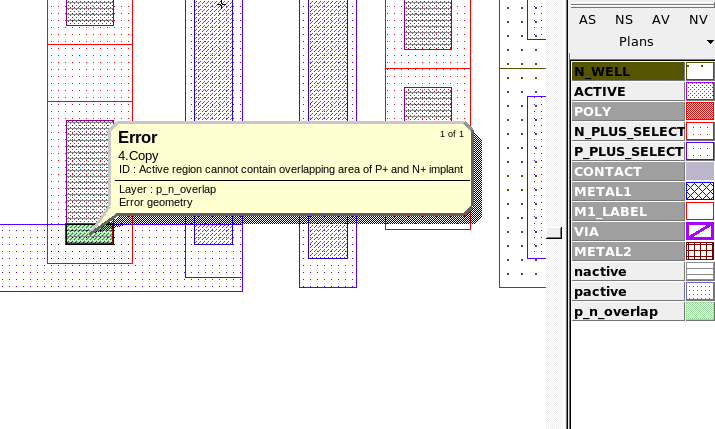
By selecting the first error and clicking on the “Load” button in the error window and selecting the Expert menu item Verification->DRC->Errors->First Error the layout view will be taken to the first violation as seen in Figure2, which shows an active region that is covered by both “P_PLUS_SELECT” and “N_PLUS_SELECT”, creating an overlapping region of the scratch layers “pactive” and “nactive”.
Output Results
Input Files
select_outside.dsf — view contents
/////////////////////////////////////
//       EXAMPLE DRC SCRIPT        //
/////////////////////////////////////
Layers:
    N_WELL		(42, 0)
,   ACTIVE		(43, 0)
,   P_PLUS_SELECT	(44, 0)
,   N_PLUS_SELECT	(45, 0)
,   POLY		(46, 0)
,   METAL1		(49, 0)
,   VIA			(50, 0)
,   METAL2		(51, 0)
;
update_layout:new=yes;


//Create "nactive" layer
And: Layer1=ACTIVE, Layer2=N_PLUS_SELECT, LayerR=nactive;

//Create "pactive" layer
And: Layer1=ACTIVE, Layer2=P_PLUS_SELECT, LayerR=pactive;

//Flag error for any pactive overlapping nactive
Select: Relation=OUTSIDE, Options=(NOT), Layer1=pactive, Layer2=nactive, LayerR=p_n_overlap;
Copy: Layer=p_n_overlap, ID="Active region cannot contain overlapping area of P+ and N+ implant";