

Minimum Required Version: Expert 4.14.0.R, Guardian 4.14.0.R
This example will demonstrate how the Guardian DRC tool can be used to resize layout objects, or more specifically, undersize them.
1. Preliminary steps
To run this example, open a Guardian DRC session and choose File->Open to load the project “drc_ex17.eld”. Then open the top cell drc_ex17 using the Cell->Open… menu.
2. Undersize command description
This command creates a new layer by resizing the regions of the input layer. When a region is undersized, its edges are shifted inside the region by a specified distance, while remaining parallel to their initial orientations.
This command is mostly used in combination with other commands to perform a more complex Design Rule Check. For example, we could undersize an implant layer (PIMP) by X um and see if the ACTIVE layer that is supposed to be completely enclosed by PIMP, still is. If any of the ACTIVE layer is not covered by the undersized version of PIMP, then the enclosure was not appropriate.
Guardian DRC provides an InDistance check, which would most likely be used in this case, but the point here is to illustrate that the command Undersized is often combined with other logic to detect a more complex rule violation.
The syntax for this rule is:
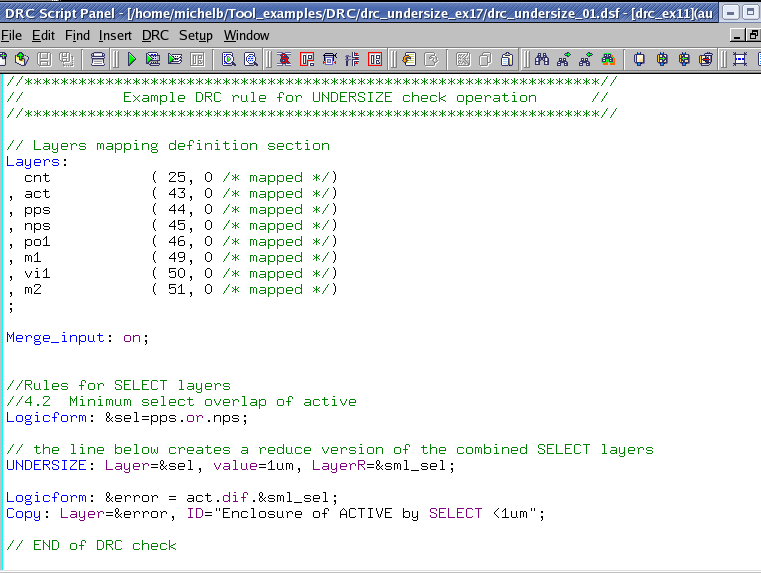
   Undersize: Value = < value >,
              Layer = < input  layer identifier >,
              LayerR= < output layer identifier >;
in which:
- Layer is the layer name being undersized
- Value is the distance in um of the undersized operation
- LayerR is the layer name in which the reduced geometries of layer would be saved
Figure 1 illustrates a rule deck that utilizes the undersized command.
The user manual “guardian_users1.pdf” can be found in lib/expert/4.14.0.R/docs/ of your installation area. Section 2.3.9.8 describes the Undersize command.
3. Experimenting with the Undersize command
Once all the example files have been downloaded and the preliminary steps described in 1.0 are completed, complete the following steps:
- Choose Verification->DRC->DRC Script panel. In this new window, choose File->Open… and select “drc_undersize_01.dsf”.
- Press DRC->Run
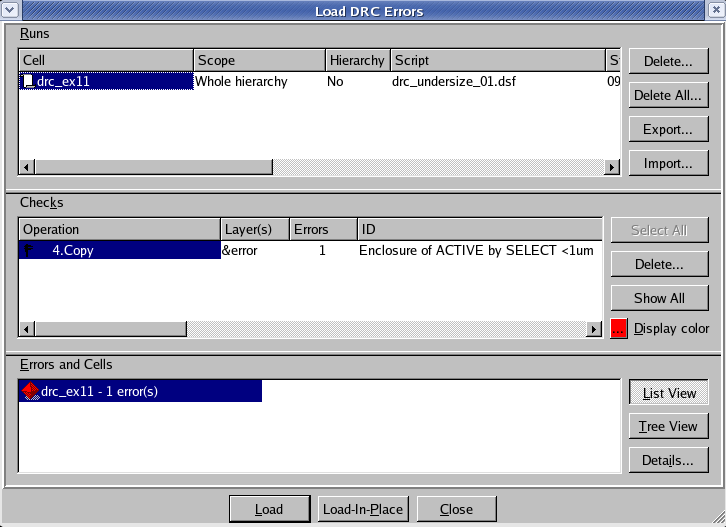
- To inspect the errors, choose Verification->DRC->Errors->Load errors… you should get a window as shown in Figure 2.
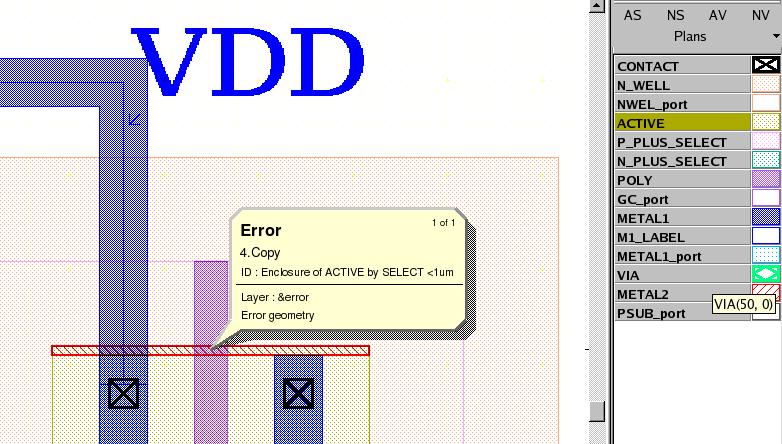
- Select the check and press the Load button located at the bottom of the window. Then choose Verification->DRC->Errors->First error to display the error in the layout, as shown in Figure 3.
- To unload the error choose Verification->DRC->Errors->Unload errors.
Note that these two toolbars can be used to access the DRC menu command. To turn the visibility of the toolbar ON and OFF, choose View->Toolbars and select DRC and DRC error inspection.

It is to be noted that Guardian DRC can also be launch from within the layout editor tool Expert. Within an Expert session follow the steps described in 1.0 to open the eld file. Then choose Verification->DRC->DRC Script panel. In this new window, choose File->Open… and select the desired DRC script. The rest of the steps are identical to the Guardian DRC flow.
Output Results
Input Files
drc_undersize_01.dsf — view contents
//****************************************************************//
//           Example DRC rule for UNDERSIZE check operation      //
//****************************************************************//

// Layers mapping definition section
Layers:
  cnt		( 25, 0	/* mapped */)
, act		( 43, 0	/* mapped */)
, pps		( 44, 0	/* mapped */)
, nps		( 45, 0	/* mapped */)
, po1           ( 46, 0	/* mapped */)
, m1            ( 49, 0	/* mapped */)
, vi1           ( 50, 0	/* mapped */)
, m2            ( 51, 0	/* mapped */)
;

Merge_input: on;


//Rules for SELECT layers
//4.2  Minimum select overlap of active
Logicform: &sel=pps.or.nps;

// the line below creates a reduce version of the combined SELECT layers
UNDERSIZE: Layer=&sel, value=1um, LayerR=&sml_sel;

Logicform: &error = act.dif.&sml_sel;
Copy: Layer=&error, ID="Enclosure of ACTIVE by SELECT <1um";

// END of DRC check