

Minimum Required Version: Expert 4.10.39.R
Expert PCell parameters support callback functions written in JavaScript. It is very useful for reflecting internal expressions for L, W, R, and C parameters of resistors and capacitors.
This example will show how to add/execute a callback function in PCell parameters.
1.0. Preliminary steps to start example
- Run the Expert application
- Load the “scripting_ex04.eld” project
1.1. Checking the PCell Scripts for callback
All types of PCells (LISA, JavaScript) may have a callback.
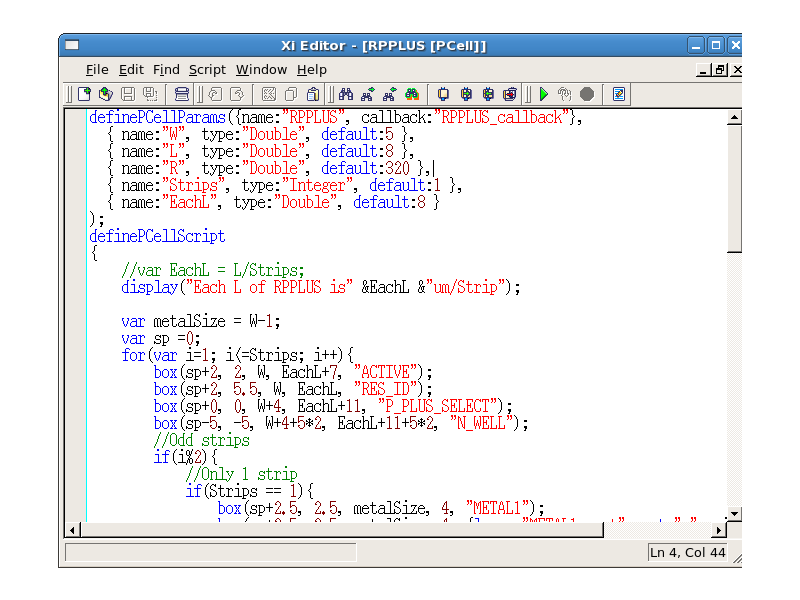
Open the “RPPLUS” cell, then a Script panel for RPPLUS
will appear automatically. This PCell is created using JavaScript, and requires a “callback:” keyword for callback in definePCellParams.
Open the “P1P2CAP” cell, then a Script panel for P1P2CAP
will appear automatically. This PCell is created using LISA, and requires a “set_pcell_callback” function in the BODY block.
1.2. Loading the callback JavaScript
To open the script window, select Tool->Script->Script Panel . From within the script window, choose File->Open and select the file callback_func.js.
This script will set up the following sub functions for the PCell callback:
- RPPLUS_callback: for the RPPLUS PCell
- PIP_callback: for the P1P2CAP PCell
- IND_callback: for the IND PCell
Callback scripts must be written in JavaScript only.
Callback script calculates R, L, and W based on R=Rsh*L/W, and L, EachL and Strips based on EachL=L/Strips, where:
- R: Resistor value
- L: Length of the resistor
- W: Width of the resistor
- Strips: Number of series segments of the resistor
- EachL: Length of each segment
1.3. Trying the callback functions
Open the “pcell_callback” cell as in pcell_callback_layout.png
. Select the RPPLUS PCell in the layout as in rpplus_layout.png
.
Change the R, L, W, EachL, and Strips parameters in the Property Bar one at a time. Other related parameter values will be updated according to the expressions in the callback function when you change active parameter in the Property Bar window.
Graphics



These examples are for reference only. Every software package contains a full set of examples suitable for that version and are installed with the software. If you see examples here that are not in your installation
you should consider updating to a later version of the software.
Input Files
callback_func.js.txt
////////////////////////////////////////
////// for RPPLUS Pcell callback ///////
////////////////////////////////////////
function RPPLUS_callback(params){
	var W = params.W.value;
	var L = params.L.value;
	var R = params.R.value;
	var Strips = params.Strips.value;
	var EachL = params.EachL.value;
	var Rsh = 200;

	if(params.W.changed){
		R = Rsh*L/W;
	}
	if(params.L.changed){
		R = Rsh*L/W;
	}
	if(params.R.changed){
		L = R*W/Rsh;
	}
	if(params.Strips.changed){
		EachL = L/Strips;
	}
	if(params.EachL.changed){
		Strips = Math.round(L/EachL);
		EachL = L/Strips;
	}

	W=Math.round(10*W)/10;
	L=Math.round(10*L)/10;
	R=Math.round(10*R)/10;
	EachL=Math.round(10*EachL)/10;

	params.W.value = W;
	params.L.value = L;
	params.R.value = R;
	params.EachL.value = EachL;
	params.Strips.value = Strips;
}

////////////////////////////////////////
////// for P1P2CAP Pcell callback ///////
////////////////////////////////////////
function PIP_callback(params){
	var W = params.W.value;
	var L = params.L.value;
	var C = params.C.value;
	var Entry = params.Entry.value;
	var Ca = 0.0075; //C area pF/um^2
	var Cp = 0.00625; //C peri pF/um

	if(Entry == "L_W"){
		if(params.W.changed){
			C = Ca*L*W+Cp*2*(L+W);
		}
		if(params.L.changed){
			C = Ca*L*W+Cp*2*(L+W);
		}
	}
	else if(Entry == "C_L"){
		if(params.L.changed){
			W=(C-2*Cp*L)/(Ca*L+2*Cp);
		}
		if(params.C.changed){
			W=(C-2*Cp*L)/(Ca*L+2*Cp);
		}
	}
	else if(Entry == "C_W"){
		if(params.W.changed){
			L=(C-2*Cp*W)/(Ca*W+2*Cp);
		}
		if(params.C.changed){
			L=(C-2*Cp*W)/(Ca*W+2*Cp);
		}
	}
	else if(Entry == "C"){
		if(params.C.changed){
			L=(Math.sqrt(Cp*Cp+Ca*C)-2*Cp)/Ca;
			W=L;
		}
	}

	W=Math.round(10*W)/10;
	L=Math.round(10*L)/10;
	C=Math.round(10*C)/10;

	params.W.value = W;
	params.L.value = L;
	params.C.value = C;
}

/////////////////////////////////////
////// for IND Pcell callback ///////
/////////////////////////////////////
function IND_callback(params){
	var radius = params.radius.value;

	if(params.radius.changed){
		if(radius < 20){
			radius=20;
		//	display("too small "&radius&" radius must be over 20um");
		}
	}
	params.radius.value = radius;
}