

Minimum Required Version
: Expert 4.14.0.R, Guardian 4.14.0.R
The
Select_Edges
command extracts edges satisfying the conditions specified with the Relation
keyword, such as a relative position to another layer, or angles.
By using
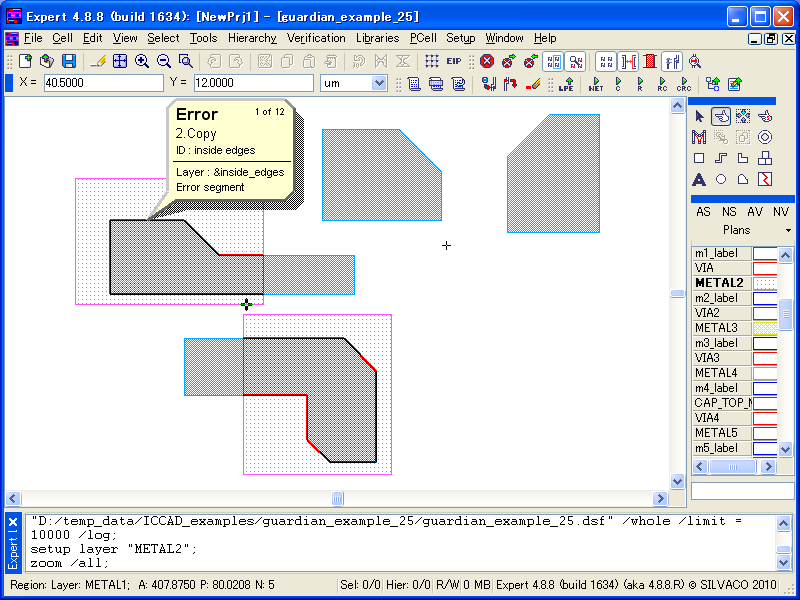
Relation=Inside
, edges from the first-layer shapes that are inside of the second-layer
shapes are extracted (see
Figure 1
).
On the other hand, using
Relation=Outside
will extract edges outside of the second-layer shapes (see
Figure 2
).
The extracted data is treated as edges data, but it may be convert to polygon data by using the
Size_Edge
command.
These commands are used as the following:
   Select_edges: Relation=INSIDE,
                 Layer1=METAL1, Layer2=METAL2, LayerR=&inside_edges;
   Select_edges: Relation=OUTSIDE,
                  Layer1=METAL1, Layer2=METAL2, LayerR=&outside_edges;
By using
Relation=Corners
, edges from the input layer are extracted based on the range of the vertex
angles, or lengths of the edges.
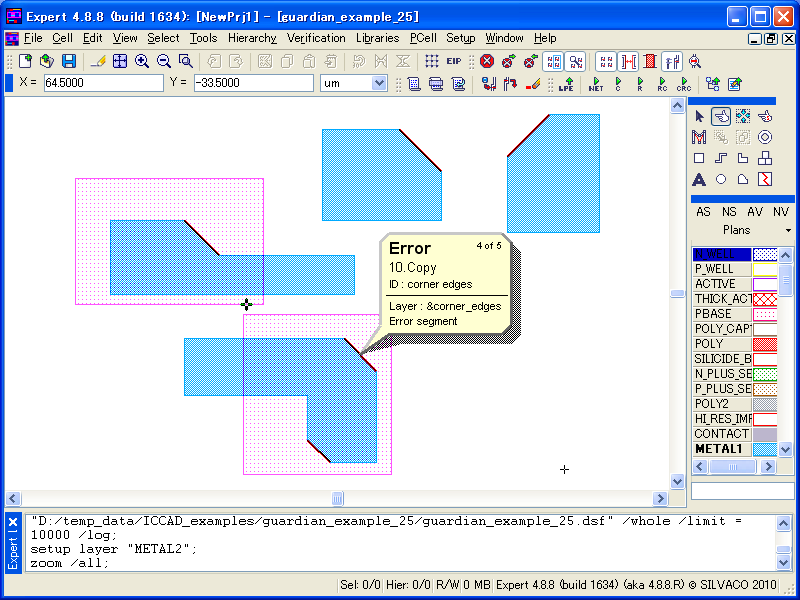
It can extract edges defined by vertices of more than 90 degrees and less than 180 degrees when the
angle1>90<180
keyword is set (see
Figure 3
).
To extract edges defined by vertices that are not 90 degrees nor acute vertices, multiple conditions
should be combined as the following:
   select_edges: relation=CORNERS,
                 layer=METAL1, angle1>90<180, angle2>90<180,
                 layerR=&corner_edges1;
   select_edges: relation=CORNERS,
                 layer=METAL1, angle1>180<270, angle2>90<180,
                 layerR=&corner_edges2;
   select_edges: relation=CORNERS,
                 layer=METAL1, angle1>90<180, angle2>180<270,
                 layerR=&corner_edges3;
   select_edges: relation=CORNERS,
                 layer=METAL1, angle1>180<270, angle2>180<270,
                 layerR=&corner_edges4;
   combine: layers=(&corner_edges1, &corner_edges2,
                    &corner_edges3, &corner_edges4),
            layerR=&corner_edges;
The actual operation steps to check the command behavior are as follows:
1) Start
Expert.
2) Select
File->Open
to load the project file
guardian_example_25.eld
and open the top cell.
It contains some polygons.
3) Select
Verification->DRC->DRC Script Panel
and select
File-> Open
in the script panel to
load the sample DRC rule file
guardian_example_25.dsf.
4) Run the loaded DRC script by selecting
DRC->Run
in the DRC script panel.
5) In the
Expert
‘s main window, select
Verification->DRC->Errors->Load Errors
or click the
corresponding button in the DRC tool bar.
Load DRC Errors dialog will appear.
6) In the Checks section, select each item and click the Load button.
The relations will be indicated in the list.
The corresponding error flags will be displayed in the design.
To learn more about Guardian DRC, the different command and their syntax as well as
the different setup options, see the Guardian DRC user manual
“guardian_users1.pdf” located in lib/expert/4.14.0.R/docs/ in your installation area.
Output Results

Input Files
guardian_example_25.dsf
select_edges: relation=INSIDE,
              layer1=METAL1, layer2=METAL2, layerR=&inside_edges;
copy: layer=&inside_edges, ID="inside edges";

select_edges: relation=OUTSIDE,
              layer1=METAL1, layer2=METAL2, layerR=&outside_edges;
copy: layer=&outside_edges, ID="outside edges";


select_edges: relation=CORNERS,
              layer=METAL1, angle1>90<180, angle2>90<180, layerR=&corner_edges1;

select_edges: relation=CORNERS,
              layer=METAL1, angle1>180<270, angle2>90<180, layerR=&corner_edges2;

select_edges: relation=CORNERS,
              layer=METAL1, angle1>90<180, angle2>180<270, layerR=&corner_edges3;

select_edges: relation=CORNERS,
              layer=METAL1, angle1>180<270, angle2>180<270, layerR=&corner_edges4;

combine: layers=(&corner_edges1, &corner_edges2, &corner_edges3, &corner_edges4),
         layerR=&corner_edges;
copy: layer=&corner_edges, ID="corner edges";