

Minimum Required Version
: Expert 4.14.0.R, Guardian 4.14.0.R
Syntax:
   SELECT: Layer1=< layer1 >, Layer2=< layer2 >, LayerR=< result layer >,
           Relation=LABEL, List=(Label List),[,Options=(NOT)];
   SELECT : Layer=< layer1 >, LayerR=< result layer >,
            Relation=LABEL, List=(Label List), Options=(C[,NOT]);
-
Layer1
is a parameter identifying the layout layer to select regions from. -
Layer2
is a parameter identifying the text label layer. -
LayerR
is a parameter identifying the resultant layer name. -
List
is a comma-separated list of labels for Label relation.
Options :
-
C
: All input layer shapes from the node labeled by a listed
label are selected. -
NOT
: If this option is present, then Layer1 region will be
selected if this region does not satisfy the remaining
conditions of the select operation.
This example demonstrates how to build connectivity information, attach text
Labels to particular nodes and then select geometries according to the nodes and text
labels.
To run the example:
1) Start
Guardian DRC
or
Expert
2) Load the
select_label.eld
file
(
File->Open
)
3) Open the
select_label
cell.
4) Load the
select_label.dsf script from the Script panel.
(
Verification->DRC->DRC script panel
)
5) Run DRC. (
DRC->Run
)
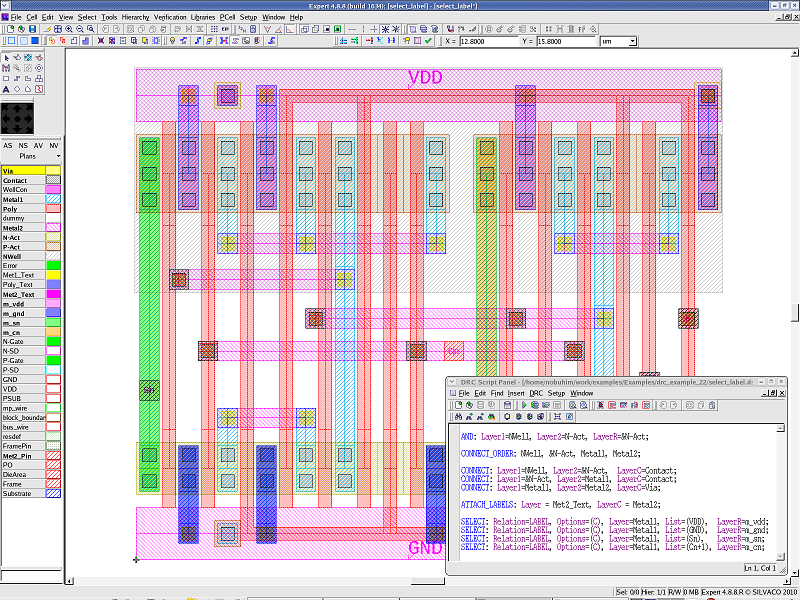
The “VDD”, “GND”, “Sn” and “Cn+1” nodes are attached to geometries of the Metal2 layer by the ATTACH_LABELS statement.
The Metal1 layer and the Metal2 layer are connected with the Via layer by the CONNECT statement.
The Metal1 layer shapes with the “VDD”, “GND”, “Sn” and “Cn+1” nodes are then selected by the SELECT statement, and the selected shapes are created in each layer. (See
Select_label.png
).
To learn more about
Guardian DRC
, the different commands and their syntax as well as the different setup options,
see the Guardian DRC user manual “guardian_users1.pdf” located in lib/expert/4.14.0.R/docs/ in your installation area.
Output Results
Input Files
select_label.dsf
AND: Layer1=NWell, Layer2=N-Act, LayerR=&N-Act;

CONNECT_ORDER: NWell, &N-Act, Metal1, Metal2;

CONNECT: Layer1=NWell, Layer2=&N-Act,  LayerC=Contact;
CONNECT: Layer1=&N-Act, Layer2=Metal1, LayerC=Contact;
CONNECT: Layer1=Metal1, Layer2=Metal2, LayerC=Via;

ATTACH_LABELS: Layer = Met2_Text, LayerC = Metal2;

SELECT: Relation=LABEL, Options=(C), Layer=Metal1, List=(VDD),  LayerR=m_vdd;
SELECT: Relation=LABEL, Options=(C), Layer=Metal1, List=(GND),  LayerR=m_gnd;
SELECT: Relation=LABEL, Options=(C), Layer=Metal1, List=(Sn),   LayerR=m_sn;
SELECT: Relation=LABEL, Options=(C), Layer=Metal1, List=(Cn+1), LayerR=m_cn;